Residential renovation contractor · 60–90 days live
One list, every weekday morning.
Laneo Core with website inquiry capture through Advanced for a residential renovation contractor: every inquiry becomes visible work with an owner, messages use wording approved once at setup, and every open opportunity carries a next action. 60–90 days live, with the recorded results below.
OPERATING RESULTS
The operating results.
Click or tap a card to bring it forward
Industry
Residential contractors — renovation, electrical, and plumbing profiles
Stack
HighLevel · automation · records — installed around the contractor’s existing accounts
Operating need
Every inquiry, estimate, and quote stays visibly owned with a recorded next action — without ripping out the tools already in place
01 — BEFORE / WITH SYSTEM
Operating models, compared.
Same contractor. Completely different operating rhythm.
Before
× 16–19 open quotes sitting with no recorded next action or clear owner
× Follow-up inconsistent, relying on memory and sticky notes
× Roughly 1 in 4 inquiries took over 24 hours to get an owner and next step
× Almost no reliable link between lead source and final outcome
After
✓ Open quotes with no next action: near zero
✓ 96% of inquiries have an owner and next action within 24 hours
✓ Messages use wording the owner approves once at setup
✓ Follow-up is systematic and stops on reply or opt-out
✓ Owner time chasing quotes: under 1.5 hours a week
✓ Recovery List keeps stalled opportunities visible
✓ Source linked to recorded outcome on every closed job
ILLUSTRATIVE PROCESS
Follow-through. One connected handoff.
Connected inquiries, current quotes and recorded next actions stay visible in the contractor’s own tools.
Illustration of the configured process. No live actions.
↗
01 / INPUTConnected inquiry
✓
03 / NEXT STEPRecorded outcome
PROCESS DETAIL
Current quote, current authority
The owner approves message wording once at setup. The contractor supplies measurements and controls scope and pricing.
New reply or opt-out evidence can stop a queued follow-up. Eligibility must be rechecked when the action executes.
Follow-through · Process illustration
03 — THE OPERATING PROBLEM
Jobs are lost between first contact and decision.
A contractor can already have a website, referrals, a calendar, and a job-management tool — and still lose jobs between first contact and a decision. The failure is usually not a lack of software. It is a lack of clear ownership, a recorded next step, consistent follow-through, and reliable stop conditions across the tools they already use.
Inquiries sit without an owner — visible as a notification, not as work
A booked estimate visit is treated as completed when the calendar slot ends
Open quotes lack a clear follow-up schedule
Open quotes have no next action and no follow-up
Follow-up keeps going after the homeowner already replied
Nobody can say which lead source actually led to decisions
04 — THE OLD PROCESS
How it typically runs today.
CONNECTED PROCESS
01
ENQUIRY ARRIVES (call / form / referral / message)
02
SOMEONE NOTICES (maybe)
03
ESTIMATE BOOKED ON A CALENDAR
04
QUOTE EMAILED (maybe the right version)
05
FOLLOW-UP WHEN SOMEONE REMEMBERS
06
WON / LOST — decided somewhere, recorded nowhere
05 — SYSTEM ARCHITECTURE
Core with website inquiry capture through Advanced.
Laneo Core (quote follow-up + Recovery List) keeps existing inquiries, estimates, and quotes moving toward an explicit decision. The optional Advanced (website inquiry capture) captures and routes new inquiries upstream and hands verified opportunities to quote follow-up. A shared deployment factory packages both for configuration-led installation — no per-client source forks.
Messages run on the agreed schedule using wording approved once at setup. Replies pause follow-up; STOP opts the customer out. The contractor keeps job and pricing decisions.
06 — INSIDE THE SYSTEM
Five workflows. Not fifty.
The product contains five business workflows. Supporting runtime components don't change that count — and Won / Lost / Paused are durable outcome states, not a sixth workflow.
Hover to preview · Click or tap to bring a workflow forward
07 — CAPABILITIES
What the system does.
Every inquiry becomes visible, owned work — with an assigned human and a due date
Messages use wording the owner approved once at setup
Follow-up stops on replies, opt-outs, and stage changes — rechecked at action time
One record per job — reschedules and updates never silently duplicate it
Recovery List — every open opportunity, one next action
Source preserved through to verified outcomes — observed chains, never inferred attribution
08 — OPERATOR INTERFACE
Your wording, agreed once at setup.
Quote, version, recipient, amount — Approve setup wording / Reject. Laneo manages the workflow around the quote; the contractor controls scope, pricing, and commercial approval. Message wording is approved once at setup, then follow-up runs on the agreed schedule.
And every weekday, the owner gets the Recovery List — every open opportunity with a useful next action, in one view.
09 — IMPLEMENTATION
Proven in stages, not big-bang.
01Stage 1
Diagnose
Revenue Diagnosis first: demand gap, capture gap, follow-through gap — or a process that's already sufficient, in which case there's no sale.
02Stage 2
Configure
Accounts and access collected, client manifest completed, system installed inactive. Existing calendars and tools preserved — recorded as reuse, integrate, or disable, never silently replaced.
03Stage 3
Accept
Builder acceptance tests, then Review Mode before controlled activation. Authority and copy reviewed before anything customer-facing goes live.
04Stage 4
Measure
Honest baselines captured, then Day-30/60/90 evidence snapshots. Verified, unknown, or not available — missing data never becomes zero.
10 — SAFEGUARDS
What the software can do — and what still needs a person.
CONTROL BY DESIGN
Clear boundaries. Human responsibility.
Each configured action retains the authority and human requirements shown here.
01
Internal owner tasks
Automatic (if enabled)
Verified assignment; staff acts on the task
02
Quote scope & price
None
Owner supplies the commercial proposal
03
Quote delivery
Configured at setup
Setup-approved wording + reply and opt-out checks
04
Customer follow-up
Configured at setup
Eligible quote; all stop checks pass at action time
05
Won / Lost / Paused
None
Human terminal decision with evidence
06
Emergency inquiries
Internal routing only
Explicit human owner — never auto-dispatch
SYSTEM SCREENSHOTView the original system screen+
Workflow view
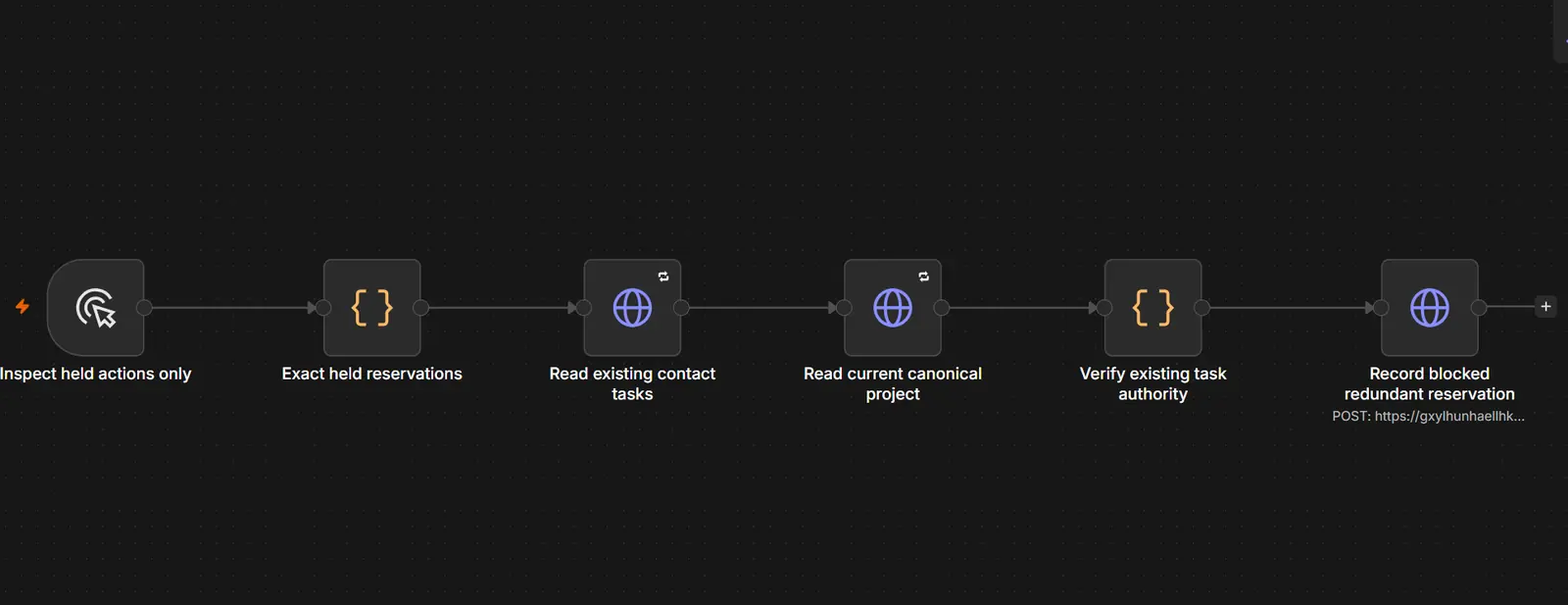
Above: held-reservation inspection — before anything is recorded as blocked, the system re-reads the existing contact tasks and the canonical project and verifies task authority. Redundancy is proven, not assumed.
SYSTEM SCREENSHOTView the original system screen+
Workflow view
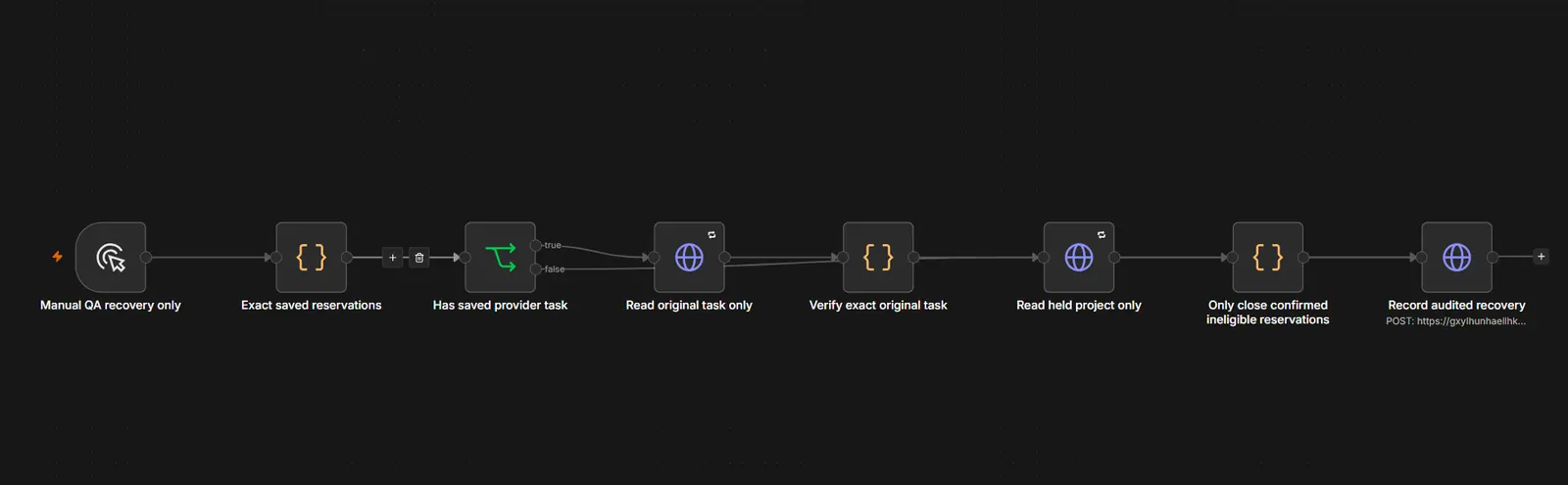
Above: manual QA recovery — only confirmed-ineligible reservations are closed, and every recovery is recorded as an audited event.
FAILURE HANDLING
A timeout means the provider may have completed the action — missing local confirmation is not proof of failure. The system holds the reservation, inspects provider state, and retains operator review rather than blindly retrying. A controlled retry needs authoritative evidence of absence, not just an empty search result.
11 — STACK & OWNERSHIP
Built on tools the client already trusts.
Installed around the contractor's existing accounts — not hidden inside a Laneo black box. The client owns their HighLevel, automation, records, sender, domain, calendar, and business data.
CLIENT-OWNED TOOL
HighLevel
the operational CRM: contacts, opportunities, staff, tasks, calendar, provider records
CLIENT-OWNED TOOL
Automation
the workflow engine: business workflows, schedules, guards, orchestration
CLIENT-OWNED TOOL
Records
the evidence layer: reservations, quote snapshots, approval receipts, outbox
12 — BUILD NOTES
What implementation uncovered.
Trade differences are configuration, not code. Electrical, renovation, and plumbing run the same five workflows with different job-type profiles and deterministic routing — no separate workflow family per trade.
Competing task ownership is a real failure mode. If inquiry capture creates the owner task, quote follow-up and independent HighLevel automations must not also create one — verified against the real destination, not assumed.
Provider verification beats provider optimism. An HTTP 200 is not delivery; independent readback of the provider's message record is what commits the Quote Sent state.
Conservative beats clever. Unknown value stays null (never zero), unknown geography goes to review, ambiguous identity is never auto-merged. Failing closed creates operator work — and that's preferable to claiming success after an unverified send.
13 — WHAT THIS MAKES POSSIBLE
Once the operation is visible.
When every inquiry is owned work with evidence behind it, the business stops running on memory. The owner can see true capacity before taking on more demand, coach follow-through instead of chasing it, and compare lead sources against verified outcomes instead of gut feel. This is what becomes possible once every inquiry and quote is visible and owned.
These operating results describe this installation, not a guarantee for another business.
ONE CONNECTED PROCESSProcess illustration
01
Inquiry ownership
Connected inquiry
Connected handoff
02
Setup wording
Owner + next action
Connected handoff
03
Guarded follow-up
Recorded outcome
See whether this system fits your business.
Book a free 20-minute Process Review. We’ll map how your process works today, find the biggest gap, and tell you honestly whether there’s anything worth installing.
 LaneoBook a call →

 CLIENT-OWNED TOOL
 CLIENT-OWNED TOOL
 CLIENT-OWNED TOOL