 Laneo
Book a call →
Laneo
Book a call →
Laneo
Book a call →
Laneo
Book a call →
V1 operating system · client outcomes not yet measured
● CPA firms — Deterministic Document IntakeA document-intake operating system for CPA firms: client emails are swept every 15 minutes, attachments extracted and filed into deterministic client folders, every intake logged to Sheets, and the firm notified. Designed, built, and tested in builder test runs — client outcomes not yet measured.

Intake sweep cadence — the dedicated intake inbox is polled every 15 minutes through the season.
Full test run processed end-to-end — extract, folders, Drive, Sheets, notify. Test evidence, not a client season.
Archives handled automatically — detected, decompressed, normalized, and merged with loose files.
One deterministic folder per client — generated names, verified before anything uploads.
Illustrative model — not a measured client result.
Documents organized — what the modelled workflow can file across a 150-client season, from roughly 450 submission emails.
Email to organized record — illustrative intake-to-filed processing target.
Seasonal admin work — estimated manual effort potentially removed.
At an assumed $30–$45/hour admin or bookkeeping cost, roughly $1,200–$2,250 of modelled administrative capacity — plus an estimated $4,500–$7,500 in avoided seasonal admin capacity, treated as hypothetical hiring equivalent, not money saved.
Actual results depend on client volume, workflow, document mix, and firm operating practices.
Each document moves through Gmail, Drive, and the operational tracker with a visible record of what happened — what arrived, when, and where it went.
| Industry | CPA firms — tax-season document intake |
| Stack | Gmail · Google Drive · Google Sheets · n8n — installed around the firm’s existing accounts |
| Operating need | Every client document captured, filed into the right folder, and tracked — without manual inbox triage |
| Build walkthrough | Watch the system build — construction demo, not outcome evidence |
Every tax season, client documents arrive as email attachments — PDFs, phone photos, ZIP archives — spread across weeks and multiple emails per client. Somebody has to download each one, rename it sensibly, sort it into the right Drive folder, update a tracker, and chase whatever never arrived. That somebody is usually whoever has a free minute, which means it happens late, inconsistently, or not at all.
Deterministic Document Intake replaces manual triage with a scheduled sweep: a dedicated intake inbox clients send to, an n8n workflow that extracts and files everything on a 15-minute cadence, Google Drive as the document store, and Google Sheets as the audit log. Deterministic means the folder a document lands in is computed from rules, not chosen by whoever is filing that day.
The folder a document lands in is computed from client identity and filing rules — the same input always produces the same folder. No judgement calls at filing time, no “I’ll sort it later” pile.
This is the production n8n canvas — the real automation, not a diagram drawn for the website:
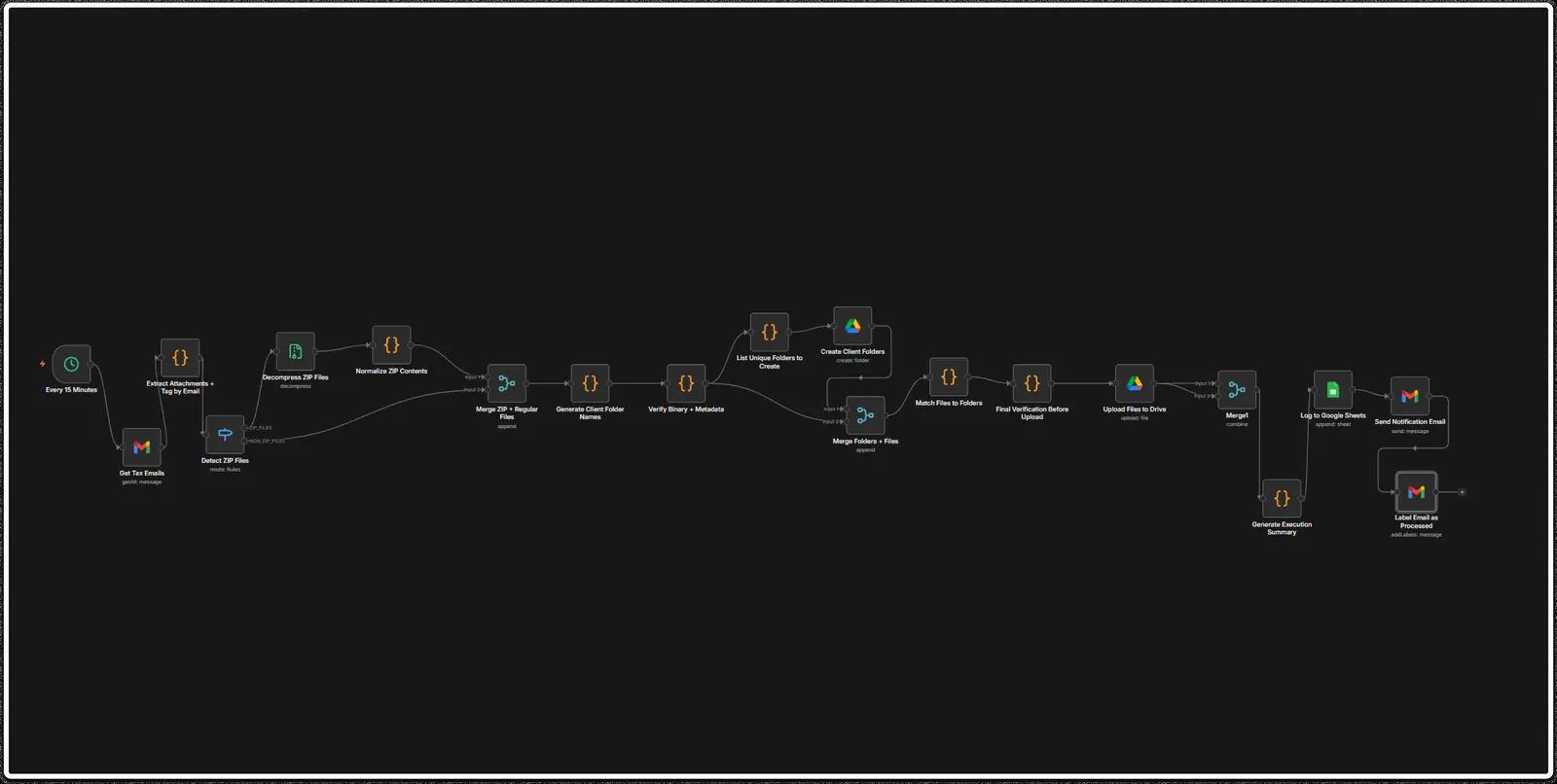
Every 15 minutes the workflow polls the dedicated intake inbox for new mail. Nothing waits for a human to notice it — arrival is detected on a schedule, around the clock, through the whole season.
Attachments are extracted from each message. ZIP archives are detected, decompressed, and their contents normalized — then merged with the loose files so downstream steps see one uniform set of documents.
Client folder names are generated from rules, then listed or created and verified. Files are checked — binary and metadata — before upload, so a corrupt or unreadable file never silently lands in a client folder.
Every intake is logged to Google Sheets with its source, the firm gets a notification email summarizing what arrived, and the processed email is labelled — the inbox stays clean by construction.
Two artefacts, from a real test run — the notification email the firm receives, and the Drive folder the client’s documents land in:
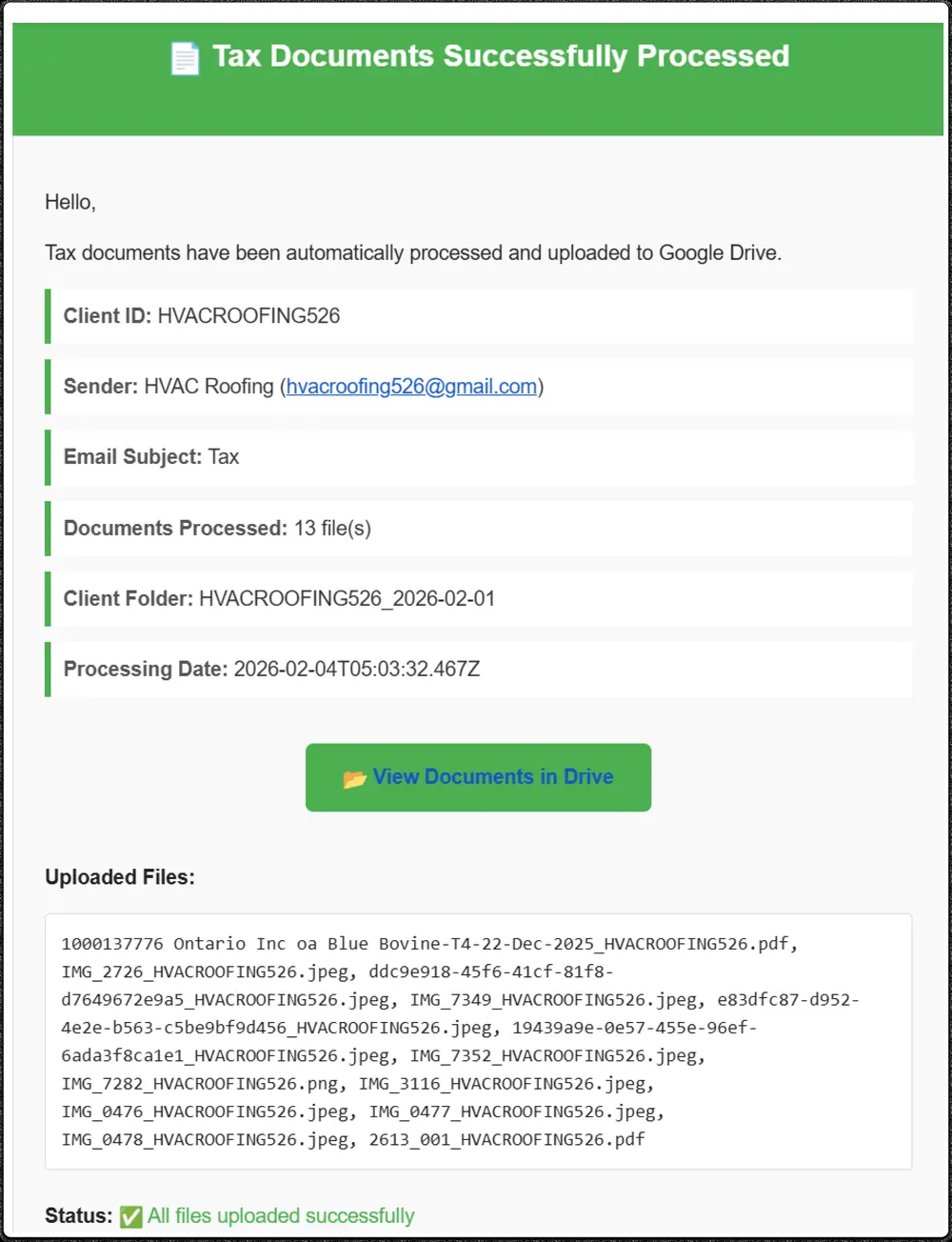
Above: the intake notification — client ID, 13 files processed, the deterministic folder name, processing timestamp, and the full uploaded-file list. One email per intake, no digging through threads.
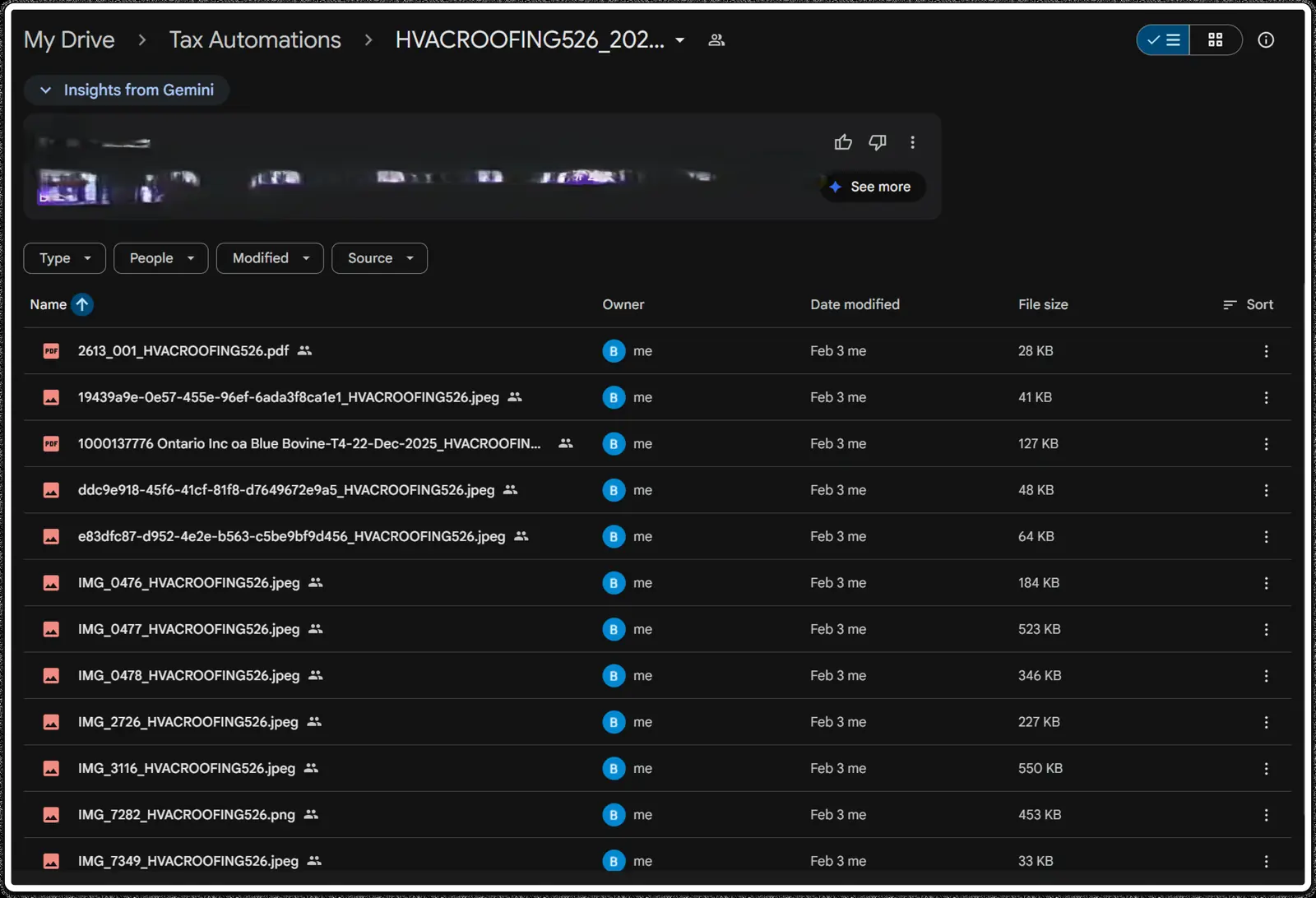
Above: the client’s Drive folder — every file renamed deterministically (document-type_client-id), filed in one place, ready for preparation work.
TEST RUN — BUILDER’S OWN TEST ACCOUNT, NOT A CLIENT SEASON| Stage | Focus | Key results |
|---|---|---|
| Stage 1 | Map the season | Document types, client list, folder conventions, and the firm’s current triage pain — measured before anything is installed. |
| Stage 2 | Configure | Dedicated intake inbox created, deterministic folder rules set, Sheets tracker structured, notification template approved. The firm’s existing Drive stays untouched. |
| Stage 3 | Accept | Test intake runs against the test account — ZIPs, multi-attachment emails, odd filenames — reviewed by the firm before activation. |
| Stage 4 | Measure | Honest baselines captured, then Day-30/60/90 evidence snapshots through the season. Verified, unknown, or not available — missing data never becomes zero. |
| Action | System authority | Human requirement |
|---|---|---|
| Reading intake mail | Automatic | Intake inbox only — never anyone’s personal mail |
| Filing documents | Automatic, within client folders | Deterministic rules; firm reviews folder conventions |
| Deleting anything | None | The system never deletes mail, attachments, or Drive files |
| Client-facing email | Notification template only | Template approved by the firm; no freeform sending |
| Missing documents | Surfaced, never assumed | The firm chases — the system shows what’s absent |
| Tax preparation | None | Filing documents is not preparing a return — preparers do that work |
A file that fails verification is quarantined from the upload — flagged in the log and the notification — rather than filed hopefully. The firm sees exactly which document needs attention instead of discovering it at preparation time.
Installed around the firm’s existing Google accounts — not hidden inside a Laneo black box. The firm owns its inbox, Drive, Sheets, n8n instance, and all business data.
 Gmail
Gmail
 Google Drive
 Google Sheets
 n8n
n8n
When every document is captured, filed, and logged with its source, the firm stops running tax season on memory. Preparers start with complete folders, partners see intake status without asking, and missing-document follow-up becomes a list instead of a worry. None of that is a measured claim — it’s what a visible intake operation allows.
Book a free 20-minute Process Review. We’ll map how your intake works today, find the biggest gap, and tell you honestly whether there’s anything worth installing.
Book a Free Process Review →The review is free. Any third-party software or usage costs remain separate.